With the combination of div tag, style:display attribute of div tag and java script one can make a simple tab view which look something like as follow:
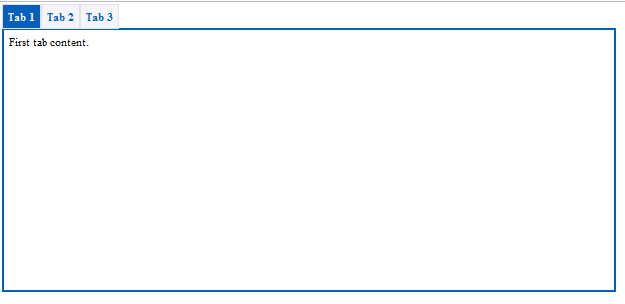
Following is the js code for that:
function tabChange(i) {
      for ( var j = 1; j <= 3; j++) {
           if (i == j) {
                document.getElementById("Page" + j).style.display = "block";
                document.getElementById("Tab" + j).className = "tabSelect";
           } else {
                document.getElementById("Page" + j).style.display = "none";
                document.getElementById("Tab" + j).className = "tab";
           }
      }
}
The html code:-
<div>
       <a id="Tab1" href="javascript:tabChange(1)">Tab 1</a><a id="Tab2" href="javascript:tabChange(2)">Tab 2</a><a id="Tab3" href="javascript:tabChange(3)">Tab 3</a>
</div>
<div id="Page1" class="box">
     First tab content.
</div>
<div id="Page2" style="display: none;">
     Second tab content.
</div>
<div id="Page3" style="display: none;">
     Third tab content.
</div>
And the css used in this example:
.tab {
    width: 105px;
    padding: 5px;
    color: #065fba;
    background: #f4f5f8;
    border: #e2e2e2 1px solid;
}
.tab:hover {
    background: #065fba;
    color: #f4f5f8;
}
.tabSelect {
    width: 800px;
    padding: 5px;
    background: #065fba;
    color: #f4f5f8;
    border: #e2e2e2 1px solid;
}
.box {
    width: 600px;
    margin-top:5;
    padding: 5px;
    background: #ffffff;
    border: #065fba 2px solid;
    height:600px;
}
a {
    color: #000000;
    text-decoration: none;
}

 harryjoy
Thanks you so much Harry Helped alot