You may have seen follow me button on some site by clicking on which a box will slide up containing details.
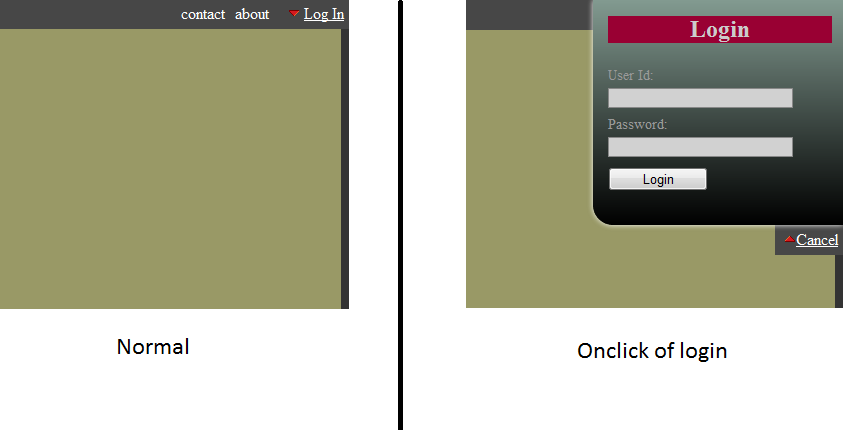
This article describes how to create such a drop down/up box using JQuery and CSS. Here I have used JQuery 1.6.2-min.js.
The HTML code:
<body style="background:#333333;color:#FFFFFF;">
<div id="nav">
    <div id="loginBox">
        <div id="loginBoxPanel">
            <div class="loginBoxContent">
                <form name="login">
                    <h1>Login</h1>
                    <label>User Id:</label>
                    <input class="filed" type="text" name="username" id="log" value="" size="23" />
                    <label>Password:</label>
                    <input type="password" name="password" id="pwd" size="23" />
                    <input type="submit" name="submit" value="Login" class="bt_login" />
                </form>
            </div>
        </div>
        <ul>
            <li id="toggle">
                <a id="open" href="#" style="color:#FFFFFF;"><img border="0" src="images/arrow-down.gif" />Log In</a>
                <a id="close" style="display: none;color:#FFFFFF;" href="#"><img border="0" src="images/arrow-up.gif" />Cancel</a>
            </li>
        </ul>
    </div>
    <ul style="margin-right:75px;">
        <!-- place your menu links here -->
        <li>
            about
        </li>
        <li>
            contact
        </li>
    </ul>
</div>
<div id="#content">
    <!-- place your content here -->
    <table style="background:#999966;width:100%;height:100%;">
        <tr>
            <td>Demo of login drop box.</td>
        </tr>
        <tr>
            <td>Demo of login drop box.</td>
        </tr>
        <tr>
            <td>Demo of login drop box.</td>
        </tr>
        <tr>
            <td>Demo of login drop box.</td>
        </tr>
        <tr>
            <td>Demo of login drop box.</td>
</tr>
        <tr>
            <td>Demo of login drop box.</td>
        </tr>
    </table>
</div>
<div id="nav1">
    <div id="loginBox1">
        <div id="loginBoxPanel1">
            <div class="loginBoxContent">
                <form name="follow">
                    <h1>Follow Me</h1>
                    <label>On This Site:</label>
                        https://harryjoy.wordpress.com
                    <label>Email:</label>
                    <input class="filed" type="email" name="email" id="email" size="23" />
                    <input type="submit" name="submit" value="Submit" class="bt_login" />
                </form>
           </div>
       </div>
       <ul>
           <li id="toggle1">
               <a id="open1" href="#" style="display: none;color:#FFFFFF;"><img border="0" src="images/arrow-down.gif" />Close</a>
               <a id="close1" style="color:#FFFFFF;" href="#"><img border="0" src="images/arrow-up.gif" />Follow</a>
           </li>
       </ul>
    </div>
</div>
</body>
The CSS magic:
#loginBox {
   position:absolute;
   top: 0;
   right:0;
   width: 250px;
   text-align: center;
}
#loginBoxPanel,#loginBoxPanel1 {
   height: 225px;
   color: #999999;
   overflow: hidden;
   position: relative;
   display: none;

   /*** Background Gradient ***/
   background: -moz-linear-gradient(bottom, #000000, #829a90);
   background: -webkit-gradient(linear, left bottom, left top, from(#000000),
		to(#829a90) );
   filter: progid:DXImageTransform.Microsoft.gradient(startColorstr='#000000', endColorstr='#829a90');

   /*** Shadow behind the box ***/
   -moz-box-shadow:0px -5px 300px #270644;
   -webkit-box-shadow:0px -5px 300px #270644;
   box-shadow: 0px 0px 8px #fff;
}

#loginBoxPanel{
   /*** Rounded Corners ***/
   -moz-border-radius: 0px 0px 0px 20px;
   -webkit-border-radius: 0px 0px 0px 20px;
   border-radius: 0px 0px 0px 20px;
}

#loginBoxPanel1{
   /*** Rounded Corners ***/
   -moz-border-radius: 20px 0px 0px 0px;
   -webkit-border-radius: 20px 0px 0px 0px;
   border-radius: 20px 0px 0px 0px;
}
.loginBoxContent {
   width: 280px;
   margin: 0 auto;
   padding: 0 15px;
   text-align: left;
   font-size: 0.85em;
}
.loginBoxContent label {
   float: left;
   padding-top: 8px;
   clear: both;
   width: 200px;
   display: block;
}
.loginBoxContent input.filed {
   border: 1px #888 solid;
   background: #d1d1d1;
   margin-right: 5px;
   margin-top: 4px;
   width: 185px;
   color: #000000;
   height: 20px;
}
input.bt_login{
   display: block;
   float: left;
   clear: left;
   height: 24px;
   text-align: center;
   margin: 10px 0;
   width: 100px;
}
#nav,#nav1{
   width:100%;
   height:30px;
   position:absolute;
   background:#474747;
   left:0;
}
#nav{
   top:0;
}
#nav1{
   bottom:0;
}
.links{
   margin:0;
   padding:0;
   float:right;
   list-style:none;
}
.links li{
   margin:0;
   padding:5px;
   background:#474747;
   list-style:none;
   float:right;
}
.loginBoxContent h1{
   background:#990033;
   color:#CCCCCC;
   width:80%;
   text-align:center;
   font-size: x-large;
}
#loginBox1 {
   position:absolute;
   bottom: 0;
   right:0;
   width: 250px;
   text-align: center;
}
The JQuery:
$(document).ready(function() {
    $("#open").click(function(){
        $("div#loginBoxPanel").slideDown("slow");
    });
    $("#close").click(function(){
        $("div#loginBoxPanel").slideUp("slow");
    });
    $("#toggle a").click(function () {
        $("#toggle a").toggle();
    });
    $("#open1").click(function(){
        $("div#loginBoxPanel1").slideUp("slow");
    });
    $("#close1").click(function(){
        $("div#loginBoxPanel1").slideDown("slow");
    });
    $("#toggle1 a").click(function () {
        $("#toggle1 a").toggle();
    });
});
You can play with CSS and Jquery to make it suite your site.

 harryjoy
Nice tutorial Thanks for sharing information.
You are welcome.